Nederlands English

Welcome to the Route Generator page

Route Generator is a free tool to draw routes on a map and generate a movie from it. This movie can be imported in your video editing software (e.g. Pinnacle Studio), so you can add it to your own movies.

News

23 August 2009: Released version 1.3 of Route Generator

This version contains the following new features:

You can download this new version from the Download section.

14 June 2009: Released version 1.3-alpha of Route Generator

Released version 1.3 as an alpha version. In this version, automatic interpolation works, but still needs improvement (smooth curves don't work correctly, yet). Automatic interpolation mode is switched off by default (so it behaves as usual). To try it out, you can activate the "Interpolation" checkbox. After that you can click on a few points on the map, instead of dragging the mouse. When you're finished, you can disable Draw mode and the route will be interpolated automatically. After that you can optionally change the duration of the route, by modifying the time in seconds that the route takes. This is the list of features that are/will be available in version 1.3.

13 September 2008: Released version 1.2.3 of Route Generator

Today I released version 1.2.3 of Route Generator. It contains one bugfix:

When a route contained more than 1000 frames (i.e. after about 40 seconds), the Bmp2Avi conversion step failed, because the frame numbering resulted in wrong ordening of the frames in the final AVI. As a result the route jumped to the last frame after a few seconds. In this version this problem is solved.

PS. I also received some new feature requests, I added them to the Planning section.

13 August 2008: Released version 1.2.2 of Route Generator!

Today I released version 1.2.2 of Route Generator. It contains some minor improvements:

Story

My name is Michiel Jansen. I started developing this program as a hobby project, because I could not find any free (and simple to use) route generation software. I've already used it successfully for a few of my own video editing projects and I think it works quite well. So I thought that others might find it useful as well and I decided to make it available on my homepage as Route Generator v1.0.

I posted a message on a Dutch forum of a site about video editing (AE-Video.nl), with the request if people wanted to download the program and give it a try. I received a lot of positive feedback. Some people started suggesting the program on other video editing forums as well. The datalimit of my home page was reached a few times and even a tutorial was written for it (see Reviews section)

Then I decided to create a SourceForge project for it and released version 1.1 of Route Generator on this project page. I also started this dedicated website.

Below you can see an example movie created with Route Generator and a screenshot of the program.
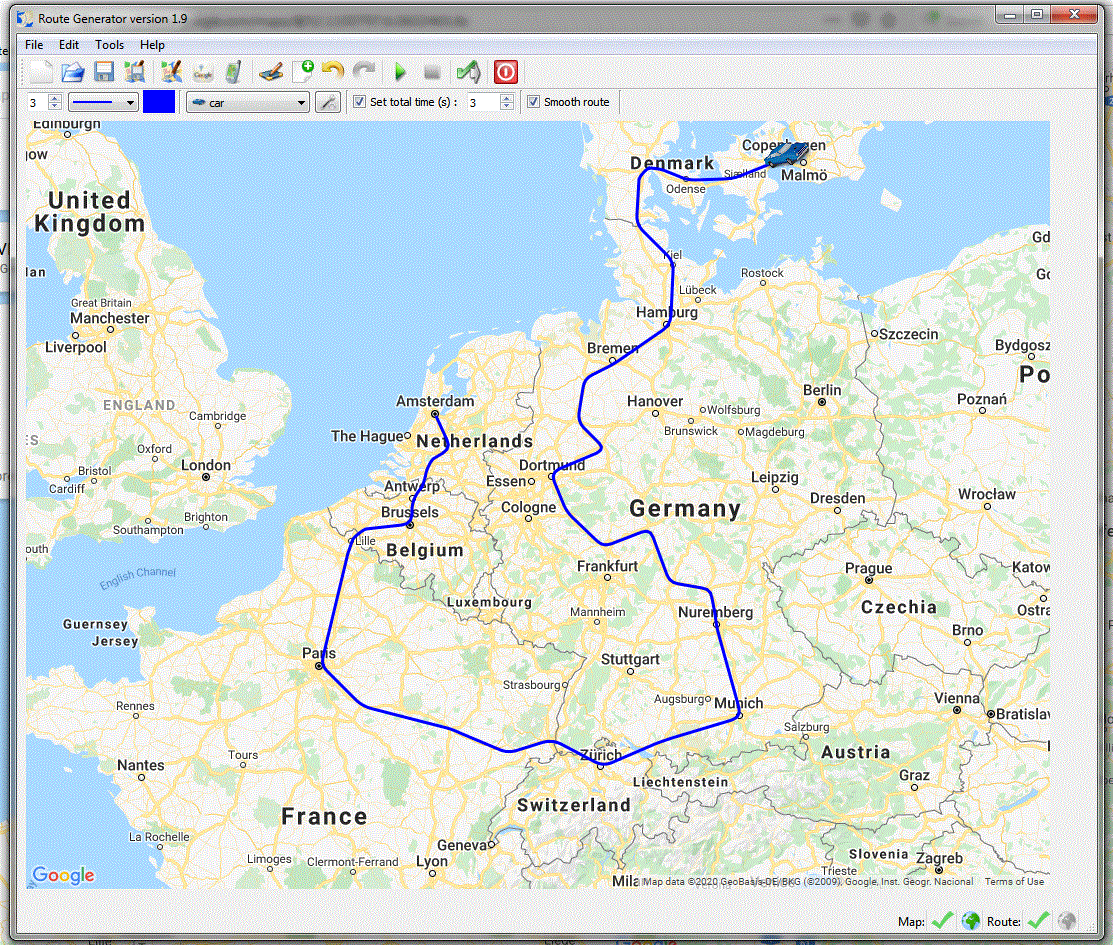
Example of a route movie that I created using Route Generator and Pinnacle Studio. Screenshot of Route Generator

License

Route Generator is released under the GPL license, this means you can use and distribute it for free. (See README.txt in the downloaded zip-file for more details)

Download

The executable version is only available for Windows (as far as I know any version of Windows should work) and it has been tested on Windows XP/SP2 and Vista. The source code is also provided in a separate zip-file. It builds and runs on Linux as well (I've tested this on a Suse 10 system).

Want to try it out? Just download the zip-file from the SourceForge project page and extract it to a newly created folder, next:

In any case the zip-file contains a README.txt, containing more details about how to install (or build) and use the tool. The program itself also contains a small tutorial from the Help menu.

Update to version 1.3:
If you've already installed an existing version of Route Generator on Windows, you can also download a patch file, containing only the files required to update. Just extract the files in the zip-file into your existing Route Generator folder and overwrite the existing files.
This is the direct link to the zip-file containing the 1.3 patch.

NOTE: Route Generator uses Bmp2Avi (Copyright (C)) Paul Roberts 1996 - 1998) to convert the generated BMP files (i.e. the frames) to an AVI file. Unfortunately Bmp2Avi is only available for MS Windows, so the BMP to AVI conversion step will not work on Linux!

Mirror download page (in the Netherlands)

At times the SourceForge.net site can be slow. As a backup the zip-file, containing the Windows executable of Route Generator can also be directly downloaded from here:

Thanks to Aat Eland, webmaster AE-Video.nl

Reviews

Joop Woldman (one of the editors of http://www.studio9plus.nl) has already succesfully used the program and has even written tutorial for it and they can be found here:

In English:

Planning

A list of new features (ideas) that can be added in future versions of Route Generator (in random order). Since I'm developing on Route Generator in my spare time, there's no real planning for which features will be added when. Probably the chance of the appearances of new features will be higher in the winter period ;-).

If you have suggestions for new features or other questions, please let me know.

You can find my e-mail address in the help->about menu of Route Generator or the README.txt file in the zip-file.